



If you are looking for – or even open to – new job opportunities, taking time to update your LinkedIn profile is a smart thing to do. The more times people see your name in their newsfeed or search results, the more your brand will become embedded in their minds.
Brand awareness generates recognition, leading to receptiveness, and trust. It can influence the hiring decision-making process. Follow these simple steps to create a stand-out LinkedIn profile that lands you great work.
Before you start, here’s a top tip: turn off your profile updates. You may choose to update your profile over a few sessions, and it is likely that you will make a few edits before you are happy with the final content. So, if you don’t turn off your activity broadcasts, you will be notifying your network of every change you make!
1. Include a photo of yourself to create trust
Just remember to use a friendly and professional image – what you use on Facebook may not be appropriate for LinkedIn.
Also consider updating your background image. It’s a simple way to create a big impact. It adds visual appeal to your profile, and it only takes 30 seconds to do. LinkedIn recommends selecting a photo or quote that captures your personality, a special team moment or milestone in your career. Check out these examples for inspiration.
2. Customise your headline
Your headline appears directly under your name on your profile page. It defaults to your current company and job title, but you can alter it to better engage with prospective employers. Alongside your photo, your headline is the first thing people will see when you appear in their newsfeeds or search results.
The key is to choose a headline that will talk to your target audience and ensure it references industry keywords, your role, and unique skills or passions.
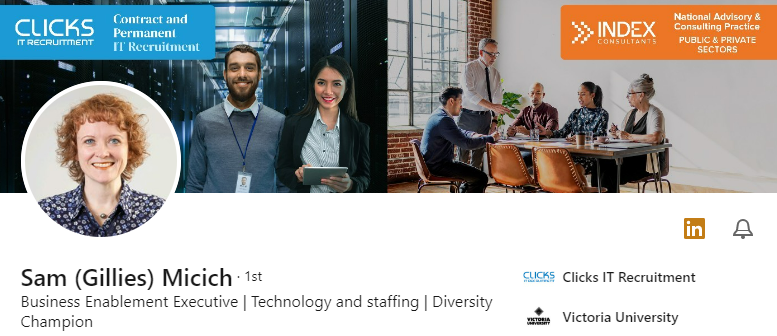
You can also strategically update your headline. For example, ‘Senior Project Manager seeking new opportunity following successful completion of multi-million infrastructure upgrade’. You’ll want to turn on your profile updates so your network knows about it.
3. Spend the time to write a unique summary to create a strong first impression
Your LinkedIn Profile summary (or About section) is prime real estate, appearing under your photo. While this free text box has a 2000-word limit, only the first 65 words are visible. After that, anyone looking at your profile needs to opt in by selecting ‘see more’.

It is important to hook your audience with a strong opener and tell a story using a relatable, human, and smart-casual tone. If you need help writing your About section, review our top tips on how to best structure your LinkedIn Profile summary.
4. Keep your work experience section brief
Your LinkedIn profile is different from your CV. You only need to include a line or two about the scope of your role and any achievements of significance.
Remember to check the language used to describe previous roles to make sure it doesn’t sound like you’re still there, and include any positions (such as volunteer, board, or passion projects) that will strengthen your credibility and experience.
5. Get active
Follow companies or individuals of interest and join relevant LinkedIn groups. Make a point of going onto LinkedIn several times each week to strengthen your brand and get noticed by the people and companies you want to work with.
- Like and comment on posts
- Share articles and news
- Write your own posts or articles
6. Grow your network
You have taken the time to create a standout profile so make sure you get as many relevant eyes on it as possible. LinkedIn have some helpful suggestions on finding and adding connections. There’s also the right and wrong way to send LinkedIn requests.
If you see that someone has viewed your profile, reach out to them to say ‘Hi, I noticed that you were on LinkedIn recently and my profile came up. Is there anything I can help with?’ and connect with them.
Clicks is an award-winning IT recruitment specialist. As Australia’s favourite recruiters, we help candidates in Melbourne, Brisbane, Canberra, and Sydney find great opportunities each day.